Residence and Document Issuing Country/Region in Binance Verification: How to Fill Them In
Step 2 of Binance's identity verification asks you to pick from three drop-downs in a row: Residence, Document Issuing Country/Region and Document Type. The first two look like the same question asked twice, so many people either pick the same country for both without thinking, or follow some post about "hidden perks" and enter a country that is supposedly "easier".
The two fields ask different things, and a wrong answer costs you in different ways. More importantly, once you confirm at the last step, Binance is blunt about it: "You won't be able to change it once confirmed." The thirty seconds you spend on step 2 decide something that, afterwards, can only be touched through Binance's update procedures and extra paperwork.
This guide covers only those two fields: what each one asks, what to base it on, when it locks, which route to take if you need to change it later, and which route Binance has not opened at all. The full sign-up flow and a cause-by-cause fix for rejected verification have their own guides on this site, so they are not repeated here.
Residence and Document Issuing Country/Region ask two different things
The short answer first: Residence asks which country or region you actually live in now; Document Issuing Country/Region asks which country or region issued the document in your hand. The two can match or differ. Someone who has worked abroad for years on a passport from home fills in two different countries. The system splits them into two drop-downs precisely because it does not assume they are the same.
On the website you reach this step through [Account] - [Identification], then [Get Verified]. Binance's Help Center article How to Complete Identity Verification for a Personal Account words step 2 as: "Start verification by selecting Residence, Document Issuing Country/Region and Document Type."
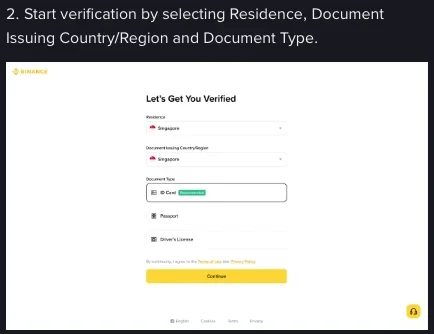
After those three, step 3 is uploading your document: straight from the current device, or by scanning a QR code to carry on with your phone. One detail matters here: "Manual upload option availability depends on the country." Two people on the same page may not see the same buttons. In other words, the countries you chose start shaping what you see from this step on.
Steps 4 and 5 follow: upload the front and back of your document, then the liveness check. The liveness check needs camera access; don't wear a hat or glasses, don't use filters, and make sure the lighting is sufficient. These steps can all be retried. The step you cannot undo is step 6, covered below.
What to base each field on
Residence: the place where you actually live long-term. Binance uses it to decide which region's rules apply to you. Its FAQ on updating your residential address puts it clearly: when you move to a new country or region, Binance must make sure your account complies with the specific regulations of your new place of residence. Seen from your side, the residence you enter brings a whole set of applicable rules with it; it carries far more weight than a label.
Document Issuing Country/Region: follow the document itself, wherever you happen to be. Look at who issued the document you are about to upload, the issuing authority on an ID card or the country on a passport cover, and enter that. Get this wrong and the system reads your photo against the wrong document template, so the upload will most likely be rejected, and you may blame the photo and keep retaking it.
Document Type: choose the document you will actually use. The form offers ID Card, Passport and Driver's License (in the example, ID Card is marked Recommended). If you pick Passport, upload a passport; don't pick ID Card and then upload a passport.
Search this topic and you will run into articles promising "hidden perks" or "this country gets approved more easily". To be clear: this site gives no such advice and does not recommend following it. There are three practical reasons. First, which products you can use is set by the local regulations where you live; a "clever" pick won't unlock more. Second, once confirmed the information cannot be changed, so chasing a rumour leaves your account stuck in a state that doesn't match your real situation, and every later step becomes awkward. Third, Binance's rules state that you cannot transfer your account to another person or substitute another person's ID for your own. Which regions are restricted and what the rules are right now is set by the current versions of Binance's Terms of Use and its official restricted-regions notice; this site does not repeat them, list them or judge them for you.
If you are in mainland China, there is more at stake here than which option you pick; read Can You Still Use Binance in China? 2026 Update first. This guide does not cover that side.
Once you confirm at step 6, the information is fixed
Step 6 of the flow is confirming your personal information. Binance leaves no room for second thoughts here: "You won't be able to change it once confirmed."
So the stretch worth slowing down for runs from step 2 to step 6. The country and region you chose, and the name and document number you entered, are shown again on the confirmation screen; that is your last chance to check them character by character. Three checks are enough: the name matches the document exactly, the document number has nothing out of place, and the issuing country/region really is the one that issued this document.
After you submit, the review starts. Submitted documents are usually reviewed within 48 hours, though some cases take longer. There's no need to keep resubmitting in the meantime.
One more thing that is easy to miss: all new users must complete [Verified] verification to use Binance's products, deposits and trading included. Existing users who haven't completed it have their account permissions temporarily changed to "Withdraw Only", which limits them to fund withdrawal, order cancellation, position close and redemption. If your account is in that state, what you can do is take your money out; for how, see Cashing Out Crypto to Your Bank: The Full Walkthrough.
Verification fails for all sorts of reasons: glare on the photo, given name and surname in the wrong order, an expired document, a liveness check in a room that's too dark. A wrong country/region is only one of them, and it usually shows up as "the document can't be recognised". Don't rush to change the country field the moment it fails; go through the usual causes in Binance KYC Failed? Photo, Name, ID and Liveness Fixes first, and change things only once you've pinned down the cause.
Changing your ID details: the 7 cases Binance accepts
"Can't be changed once confirmed" means you can't go back and edit it yourself. Binance does keep an update route open, though, and lists the cases in which identity verification information can be updated. There are 7:
- the documents have expired;
- the name on the document has changed;
- the ID number on the document has changed;
- the nationality has changed;
- you need to update or replace your existing documents to meet a specific fiat channel's requirements;
- you want your name in a language the system recognises (for example, switching from a local-language ID card to an English-language passport);
- you need to update documents to meet Binance Card requirements.
Note that a change of country of residence is not on this list. A change of nationality can go this way; a move abroad can't. Moving uses a different entry point, covered in the next section. The distinction is more than wording: in Binance's system, ID details and residence belong to two separate processes, and the wrong entry point can leave you going round in circles in the Help Center.
The update route runs: [Identification] page → [Update Identity] → choose the reason → select the document's issuing country/region and document type → follow the prompts → wait for the email notification. Note the third step: you pick the issuing country/region again, and again it follows the document.
If your situation isn't one of the 7, say "I just want to try a different country", this route has nothing for it. That gap comes from Binance's own list, which simply has no such item, and has nothing to do with caution on our part.
If you have actually moved country: changing residence is a separate route
A change of residence starts from [Account] → [Identification]: scroll down to the option for editing your address, choose the country or region you're moving your residence to, continue, fill in the detailed address, continue again, and upload the documents as instructed.
After you submit, the review of your proof of address may take 1 to 2 working days, and you'll be notified automatically when it's done, with no need to contact support. Binance states this point explicitly in its FAQ.
What matters more is what happens after the change. Binance's FAQ makes two points plainly. One: when you move to a new country or region, Binance must ensure your account complies with the specific regulations of your new residence, so you may need to redo identity verification. Two: after changing your country/region of residence, you may lose access to some products you could use before and may gain access to some new ones, depending on local regulations; to find out which products are available in your new country, Binance tells you to contact customer support.
Put differently, changing residence moves your whole account under another set of rules. Some features disappear and others appear, decided by local regulations rather than by what you'd like. That also answers "is another country a better deal?": what you move into is a different set of constraints, which won't necessarily suit you better.
One concrete limit should be stated exactly. Binance's FAQ says that, due to significant changes relating to the financial promotions regime, residence cannot be changed to the United Kingdom in the short term. The line was still on the page when we checked in September 2026, but that page's own last-updated date is November 2024, so the sentence has been up for some time, and Binance has not said how long the restriction is meant to last or whether it still holds today. If you really need to switch to the UK, rely on the official page as it reads when you check it, and don't treat this summary as the final word.
Questions about these two fields
Do Residence and Document Issuing Country/Region have to match?
No. They are two independent fields; fill each with the facts: where you live goes in one, who issued your document goes in the other. In Binance's example form both read Singapore, which only means the two values happened to coincide in that example; they don't have to match.
Will choosing a certain country unlock more features?
Claims like this are common in search results, but they get cause and effect backwards. Which products you can use depends on the local regulations that apply where you live. Binance says so plainly when it explains what follows a change of residence: you may lose access to some products and gain access to others, depending on local regulations. There is no menu of perks to pick from. For where a particular country stands right now, check Binance's Terms of Use and its official restricted-regions notice in the version current when you look.
How long does verification take?
Submitted documents are usually reviewed within 48 hours, though some cases take longer; the document review for a change of residential address may take 1 to 2 working days, with an automatic notification when it's done. They are separate processes with separate timelines, so don't add them together.
Can I open another account and start over with a different country?
Binance's rules are clear: you cannot transfer your account to another person or substitute another person's ID for your own. If you already have a verified personal account, you can create a separate entity account or use the sub-account feature, which the verification article says lets you create up to 5 sub-accounts under your personal account. Sub-accounts are an account structure under the same person, meant for keeping funds and strategies apart; they offer no way to start over under a new identity.
The help article doesn't match the screen I see?
It happens. The Chinese version of that help article, for one, notes at the bottom that differences may exist between the English original and translated versions, that translated content may be AI-generated, and that the English original prevails where they differ. If you are reading Binance's help pages in another language and they don't match the interface, switch the page to English and check again; that usually clears it up. You can find both articles by searching the Binance Help Center for "How to Complete Identity Verification for a Personal Account" and for the article on updating your residential address.
There's no trick to these two fields; fill them in truthfully: where you live, who issued your document, the document type you'll actually upload, and a character-by-character check at step 6 before you confirm. For the whole verification flow in order, see Binance Sign-Up Guide: From Email to KYC, and What to Do When You Get Stuck; once you're verified, set up 2FA and an anti-phishing code as well, as covered in Crypto Account Security: How to Set Up 2FA and an Anti-Phishing Code.