Binance Sign-Up Guide: From Email to KYC, and What to Do When You Get Stuck
Signing up for Binance happens in two stages: open the account with your email, then complete identity verification (KYC). The second stage is where applications get bounced, especially at proof of address, which only some tiers ask for — and the error often just says "information could not be verified."
Below, in order: what to gather, filling in the sign-up form, doing KYC, and troubleshooting when verification stalls. Binance has redesigned its pages a few times over the past couple of years, so button positions and wording shift a little; each step below explains what it's for, so you can still find your way if a button has moved.
What you need to open a Binance account
A lot of people only start hunting for an email or digging out their ID once the sign-up page is already open, then quit halfway because something's missing — and end up going around the loop a few extra times. Get the four things below sorted first and the rest goes much more smoothly.
An email you use regularly and will keep control of long-term. This email is the "master key" to your account — password recovery, security alerts, notices about money moving in and out all run through it. Don't use a work email (you lose it when you leave the job), and don't use a temporary or ten-minute throwaway address. Gmail, Outlook and other mainstream providers are all fine; the key thing is that this email itself needs a strong password and, ideally, two-factor turned on too — otherwise your account's security is built on sand. Some people like to open a dedicated email just for crypto, kept separate from their everyday social and shopping accounts. That's a good habit: it cuts the odds of being caught in a credential-stuffing attack or singled out by phishing.
A phone number that can receive text messages normally. Linking a phone isn't required at sign-up, but it's worth adding from the start — it's your second recovery channel besides email. Just use your own number, the one registered in your name that you use long-term.
The original ID document for identity verification. This is what the KYC step uses, usually a national ID card or passport. First check that it hasn't expired, that the photo is clear, and that all four corners are intact. What you'll be doing shortly is photographing it live with your phone, not pulling an old photo or screenshot from your gallery — more on that later, because it's where a lot of people come unstuck.
A stable, clean network connection. The sign-up and verification process includes steps like facial recognition and uploading photos, and if your connection drops mid-way, you may have to start the whole flow over. There's also one important point: crypto exchanges have compliance requirements about where an account is registered and used, and some countries and regions are restricted from service. If you, or your network's exit point, fall in a restricted area, you may be blocked right at the sign-up or verification stage. That's not a technical glitch, and re-shooting photos won't fix it; Binance's official statements for your region are the source of truth.
Opening an account costs nothing, and it doesn't mean you have to buy any crypto right away. But crypto assets are extremely volatile and you can lose everything — please hold that in mind before you begin. This site is education only; it won't make any investment decision for you. Opening the account well and protecting it is the first step. When to invest, and how much, is a separate matter — don't let a "just jump in" impulse push you.
Walking through the sign-up, step by step
With everything ready, let's get into it. The whole sign-up really comes down to three things: give the platform your email, set a password, and enter the invite code. Here they are one at a time.
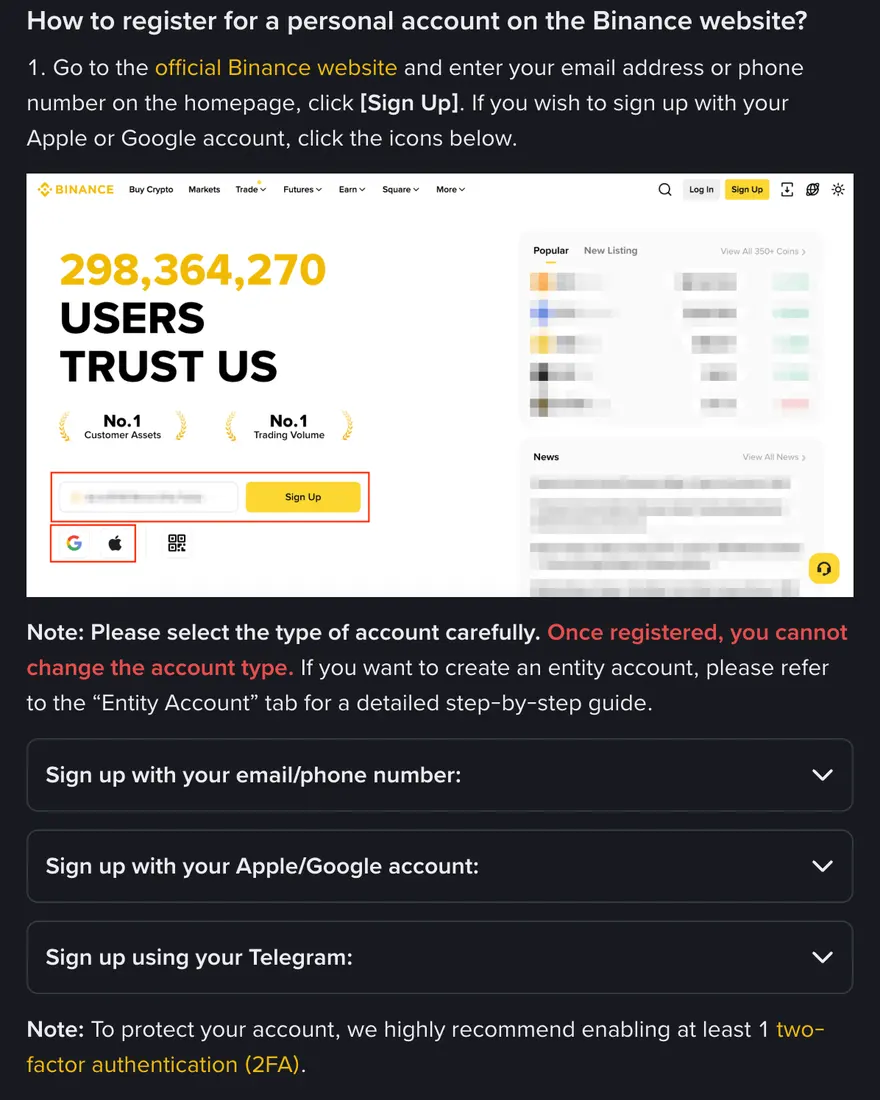
Step 1: Open the sign-up page and enter your email
Going in through our sign-up link takes you to Binance's official sign-up page. One thing to be clear about: what this site provides is a redirect link with the invite code attached, and where you land is still Binance's own site — the domain and the pages are Binance's, so you just operate it as normal. The sign-up page usually lets you choose between signing up "with email" or "with phone number." Personally I lean toward email, for the reason mentioned earlier — email works better as a long-term primary account identifier, and the email channel stays more stable when you change phone numbers or regions.
Enter the regular email you prepared. This step almost never goes wrong, but one small reminder: double-check the spelling isn't off by an extra letter or a missing dot, because every verification email afterward comes here. Get it wrong and you'll keep not receiving codes, thinking the system is broken.
Step 2: Set a genuinely strong password
On the password step, beginners tend to take the easy route — and plenty of stolen accounts trace back to exactly this. A few practical pointers:
- Don't reuse a password from somewhere else. Many account takeovers aren't a hacker cracking your password on the spot; they're attackers taking a password that leaked from some site breached years ago and trying it everywhere. If you used the same one on the exchange, you've handed over the door key too.
- Make it long and varied. Mix in upper and lower case, numbers and symbols, and stretch the length out to a dozen-plus characters. A "nonsense sentence" you can remember but others can't guess is a good approach.
- Store it in a password manager. Don't keep it in your phone's notes, a chat app's saved messages, or a txt file on your desktop. A decent password manager will generate and hold these long, messy passwords for you — all you have to remember is the one master password.
For why a password alone isn't enough, see Investopedia's explainer on two-factor authentication (2FA) — that's what the 2FA step after sign-up is for.
Step 3: Enter invite code BN666X
This is the step beginners miss most often, and the one that affects your long-term costs the most. On the sign-up page, there's usually a field labelled "Invite code," "Referral code," or in English Referral Code / Referral ID. Some pages keep it collapsed by default, marked "optional" or behind a little arrow, so you have to expand it to see the input box — and plenty of people simply don't notice and skip right past it.
In that field, enter BN666X. If you came in through our sign-up link, the field is probably pre-filled — just check that it reads BN666X. If it didn't fill in automatically, type it in by hand. The invite code adds no charge of any kind, and it lowers the trading fees you pay afterwards. How that works, and what this site earns from it, is covered in a later section.
There are a huge number of phishing sites in crypto. They build a fake login/sign-up page that looks almost identical to Binance's, to trick you into entering your account and password. Always go in through the official domain or a trusted link, and once you land, check the spelling of the domain in the address bar. Anything that asks you to "transfer some money first to activate your account" or "give your password or verification code to support" is a scam — the platform will never ask you for your password or a verification code. We've written a whole guide on avoiding traps as a beginner; see the related reading at the end.
Step 4: Accept the terms and pass the slider check
Next it asks you to tick the user agreement and privacy policy. Both are long; at least skim these parts: the things you care about — "who's responsible if funds are lost," "which regions aren't served," "how fees are charged" — are usually in there. Then there's a human-verification step, a slider puzzle or pick-the-image task; just follow the prompt and drag it into place. This step occasionally fails a few times due to a flaky connection — refresh, drag a little slower, and it'll generally go through.
Step 5: Get the code from your email and activate the account
After you submit, the platform sends a verification code to your email (usually six digits, valid for a short time). Go back to your inbox, copy it over and enter it. If nothing arrives after a few minutes, first check the spam/promotions folder, then confirm you didn't mistype the address, and if all else fails hit "resend." Once the code is entered correctly, your basic account is open.
At this point you have a Binance account you can log into — but you can't properly trade or withdraw yet, because identity verification (KYC) isn't done. The next section covers how to do KYC.
Sign up with our invite code BN666X for up to 20% off trading fees*
Create your Binance account →* Actual rate shown on Binance's promo page, subject to change. CoinFledge is an independent guide, not affiliated with Binance.
What identity verification (KYC) is actually checking
KYC stands for Know Your Customer — literally, "knowing who your customer is." It can sound like the platform being nosy, but it's a hard compliance requirement for the vast majority of legitimate financial and crypto platforms worldwide: they need to confirm there's a real, legitimate person behind the account, to satisfy anti-money-laundering (AML) and counter-terrorism-financing rules. It's something Binance has to do to operate legally. For you, a verified account also runs more smoothly when it comes to withdrawal limits, unlocking features, and recovering your account.
For a more thorough look at what KYC is and why it exists, you can read Investopedia's explanation of Know Your Client; for Binance's own step-by-step on the verification process, search "identity verification" in the Binance Help Center for the latest version. Rules and interfaces change, so treat the official pages as the source of truth.
What documents KYC usually asks for
It varies slightly by region and verification tier, but the common items are these:
- Basic personal information: full name, nationality, date of birth and so on, which must exactly match your ID document.
- Identity document: an official ID such as a national ID card, passport or driver's licence. The system usually has you photograph the front and back of the document live with your phone, rather than uploading an old image from your gallery.
- Facial recognition (liveness check): facing your phone or computer camera, you blink, turn your head or read out numbers as prompted, to prove the person holding the document is really you.
- Proof of address (only for some tiers): certain higher verification tiers ask for a document proving where you live — say a recent utility bill or bank statement — which needs to show your name and address, with the date within the valid window. This is the step where a lot of people get stuck.
Roughly how verification goes
Once logged in, find an entry like "Identity Verification" or "Verification" under your profile or account security, and the system walks you through it: choose your country of residence, the country/region that issued your document and the document type, then upload the document, then do the face check, then confirm your personal details (they can't be changed once confirmed), and add proof of address if needed. At each step it gives you live feedback on whether the photo is acceptable. I'd strongly suggest doing verification on your phone, because for photographing the document live and doing the liveness check, a phone's camera and overall experience are far smoother than a computer's webcam.
After you submit comes the review wait. According to the Binance Help Center, submitted documents are usually reviewed within 48 hours, though special cases can take longer. Don't keep logging out, back in, and re-submitting after you've submitted — that can sometimes send your review to the back of the queue. Just wait patiently and keep an eye on your email and in-app notifications.
From uploading your document to confirming your personal details at the end, your name, spelling and ordering have to match the document exactly. Middle names, compound surnames, and the order of name spellings are the details most likely to slip. The moment what you entered doesn't line up with the document, even a crystal-clear facial scan gets bounced. Checking it against your document word for word before submitting saves you most of the hassle later.
KYC rejected: the four most common causes
Most rejections come down to four things: glare or a cut-off corner on the document photo, details that don't match the document, a poor setting for the face check, or a proof of address that doesn't qualify. For the first three, work through Binance KYC failed? What to check; the proof-of-address requirements are below.
Proof of address rejected over and over
If you've reached the tier that needs proof of address, this step gets stuck especially easily. The key points: the document must show both your name and address, the date must fall within the platform's required window (usually the last few months), the document must be complete and clear, and the type must be accepted (an official document like a bill or statement, not a note you scribbled or a screenshot of a web page). A bill with the name and address on different sides, for instance, often can't be verified; a bank statement with both on the same page and a recent date usually goes through. When you're rejected, check these conditions one by one and you can usually pinpoint it.
Once your account is open: 2FA, anti-phishing code, withdrawal whitelist
With the account open and verified, don't rush to deposit money and buy crypto. Do the two things below right after signing up — they take under ten minutes.
Turn on two-factor authentication (2FA)
2FA means that for sensitive actions like logging in and withdrawing, on top of your password you also enter a rotating code. That way, even if your password leaks, someone without the code on your phone still can't get in. I'd strongly recommend using an authenticator app (like Google Authenticator or Authy) rather than relying on SMS codes alone — SMS can be stolen through "SIM swap" attacks, whereas an authenticator app's rotating code lives only locally on your phone, which is safer.
During setup, the system gives you a "secret key" string or a QR code; scan it with your authenticator app to link it. There's one crucial move here: be sure to write that secret key / recovery code down and store it offline somewhere safe (on paper, or in a password manager — either works). If your phone is lost or you switch devices, that code is how you restore 2FA on the new device; without it, you may lock yourself out of your own account. On how 2FA works, the Investopedia two-factor explainer linked earlier is clear and worth a read.
Set an anti-phishing code
Set an anti-phishing code of your own under account security. From then on, every official Binance email carries it; if an email doesn't, don't click its links. Binance Academy, the learning platform Binance runs, has plenty on account security worth going through when you have time.
When you do eventually withdraw crypto, remember to turn on the "withdrawal address whitelist" (which only allows withdrawals to addresses you've added and locked in advance). That way, even if your account is breached, an attacker can't withdraw your coins to their own unfamiliar address. Just know it exists for now, and find it under account security when you need it.
How much the invite code saves, and how this site gets paid
When you sign up through our invite code BN666X and your trades generate fees, Binance shares a portion with us through its referral program. This is how the site earns its keep, and we say so in the open rather than hiding it. The key point is this — that referral cut is not extra money charged to you. It's a portion Binance gives back to the referrer and to you, out of the fee it was going to charge anyway. So signing up with the invite code doesn't make things more expensive; it actually gets you a discount on fees.
How much of a discount, exactly? Signing up with our invite code BN666X gets you up to 20% off trading fees*. Binance sets this rate; the actual figure is whatever Binance's current promo page shows, and it can change with platform policy. So there's no promise here of "permanent" or "definitely 20%"; what I can tell you is the cap and the conditions, plus this — entering the code beats not entering it, because if you leave that field blank you get no discount at all and simply pay more.
While we're at it, a word on how fees themselves are worked out, so the various numbers don't dizzy you. Exchanges generally split charges into two tiers, maker and taker, and the rate itself is a small percentage; the coin, the trade type, your account level, and whether you pay with the platform token all affect the final rate. For exact rates, go by the fee page in the Binance Help Center; they change with account level and promotions. Our fee calculator shows the difference with and without the discount once you enter an amount — no login needed, and the numbers you type aren't uploaded.
One more time on the boundaries: this site is an independent third-party starter guide. We are not Binance, nor Binance's official agent or partner. We don't touch your money, don't operate your account for you, and don't match trades. Every trade happens inside your own Binance account, and everything here is for learning and reference only, not financial advice.
Common questions: cost, review time, adding a missed invite code
Does signing up for Binance cost money?
Opening an account is free. Fees only come up when you make trades — that's a trading cost, a different thing from a "sign-up fee." Signing up with invite code BN666X also gets you a discount on those fees.
Can I use the account without doing KYC?
You can log in, but Binance says new users have to complete standard identity verification before using its products and services, including deposits and trading. KYC is a hard compliance requirement of the platform, so if you want to use the account normally you have to do it; the process and the sticking points are covered in full above.
How long does verification usually take?
According to the Binance Help Center, documents are usually reviewed within 48 hours, though special cases can take longer. After submitting, wait patiently, don't keep resubmitting, and keep an eye on your email and in-app notifications.
I signed up before without an invite code — can I add it now?
Yes, with conditions. According to Binance's referral program FAQ, an account that missed the code can bind one from the Referral page if all of these hold: it was registered less than 30 days ago, it has no deposit or trading history, it has no existing referral relationship, it is a main account, its identity verification details haven't been used for another account in the past 180 days, and it hasn't been flagged for wash trading. A referral link that's already in place can't be changed or removed, and closing an account to re-register with a different code may cost you the rewards. If you haven't signed up yet, entering BN666X in that field at sign-up is the simplest route.
If I sign up with the invite code, does my information get exposed to you?
No. The invite code only tells Binance which referrer a new user came through, for settling the referral. Your sign-up details, documents and funds stay inside Binance's own systems the whole time; this site can't access them, and doesn't want to.