Renew Your Expired ID First, Then Update Binance Verification
When a Chinese resident ID card expires, the Binance account verified with it can be brought up to date: an expired document is one of the reasons Binance accepts for updating verified identity information. The timing needs care, though. Binance's help page How to Update My Verified Identity Information? (the update guide, from here on) says that once you declare the update, the account is restricted to Withdrawal Only mode until all of the new information has been submitted and verified. Until the new ID card is in your hand, hold off on starting the update.
The update guide does not say what happens to an account on the day the document expires. The one restriction it states outright comes after you start the update yourself.
An expired document is on Binance's own list of reasons to update
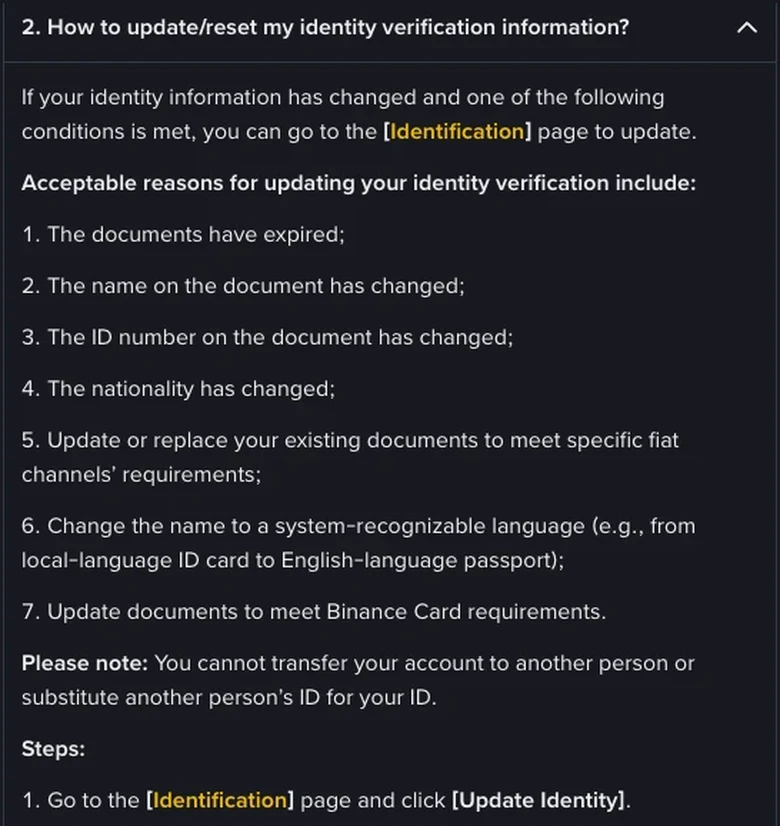
Renewing an ID card that has reached the end of its validity falls under the expired-document case. The FAQ in Binance's How to Complete Identity Verification for a Personal Account? (the verification guide) lists the acceptable reasons below; your identity information has to have changed, and any one of them is enough:
- the documents have expired;
- the name on the document has changed;
- the ID number on the document has changed;
- the nationality has changed;
- existing documents are being updated or replaced to meet specific fiat channels' requirements;
- the name is being changed to a system-recognizable language, for example from a local-language ID card to an English-language passport;
- documents are being updated to meet Binance Card requirements.
China's Resident Identity Card Law makes the citizen identity number a unique code that stays with each person for life, so the number on the new card is the same as on the old one, and renewing a card at the end of its validity doesn't involve a change of name either. The name and number Binance checks stay as they were; what changes is mainly the validity period and the photo. The options for a changed ID number and a changed name therefore don't apply to a routine renewal, and our reading is that the expired-document reason is the one to pick.
An account can't be transferred to someone else, and another person's document can't stand in for your own; that note comes with the same FAQ. While the new card is still being issued, put aside any thought of using a family member's ID as a stopgap.
To see when your own card runs out, the Resident Identity Card Law sets the validity period by your age when you applied:
| Age at application | Validity of the ID card |
|---|---|
| Under 16 (applying voluntarily) | 5 years |
| 16–25 | 10 years |
| 26–45 | 20 years |
| 46 and over | Long-term |
As an example, a card issued at 25 is a 10-year card and expires at 35. Renewing at 35 falls in the 26–45 band, so the new card runs for 20 years and expires at 55, and the one issued after that is a long-term card. If your ID card is within reach, check the validity dates printed on it now.
Why wait for the new ID before starting the update
The update guide ties the restriction to the declaration: the account goes into Withdrawal Only mode as soon as you declare the update and stays there until the new information has been verified. It does not wait for an upload to succeed.
That settles the order. Suppose you start the update the moment you notice the card has expired, with only the old card to hand. The whole reason for the update is that this card has expired, so uploading it again gets you nowhere, and the account stays restricted until the new card arrives. With the new card already in hand, the restricted period shrinks to the review at the end. Submitted documents are usually reviewed within 48 hours, though it may take longer in some cases, according to the verification guide. The update guide adds that after the email you can go on to submit KYC verification again, so the restriction may last longer than two days.
The verification guide describes a similarly named mode, Withdraw Only: existing users who haven't completed the Verified level have their account permissions changed to it temporarily, with services limited to fund withdrawal, order cancellation, closing positions and redemption. That passage is about a different group of users and may not match an account in the middle of an update exactly; it gives a rough idea of what the mode's name implies and no more.
Orders that haven't filled, futures positions still open, coins sitting in savings products: decide which to keep, which to cancel and which to close before you start the update. The update guide doesn't list what Withdrawal Only mode still allows, so these decisions are better made before the restriction begins.
The order, from renewing your ID to submitting the update
Let each step settle before taking the next:
- Renew your ID card and collect the new one. Apply where your household is registered, or wherever local rules allow. The old card has to be handed in when you collect the new one, so the photos you upload afterwards can only be of the new card.
- Pick your moment. Choose a stretch of days with no trade you urgently need to make before going further; if you have open orders or positions, deal with them first, as in the note above.
- Find the update entry. On the web, the verification guide's path is to go to the Identification page and click Update Identity. In the app, the update guide's path starts on the home page with an icon that it shows without naming; tap it, tap the [>] arrow to open your account information, then Verifications, then Update Identity. If you can't find the icon, compare your screen with the one shown in the update guide.
- Choose the reason and the document. Select the expired-document reason and continue. For a mainland Chinese ID card, choose China as the issuing country or region and ID card as the document type, continue again, and follow the on-screen prompts through the remaining steps. Whether manual upload is available depends on the country; if the page doesn't offer it, upload the way it asks. If your photos are sent back, go through the reasons a Binance KYC submission fails one at a time. If the drop-down list of reasons doesn't include yours, the update guide says to consult Binance's customer service team, and it points to Binance Support if you can't get through the update.
- Submit, and wait for the email.
How long review takes, and what to do when the email arrives
After you submit, review is usually completed within 48 hours, longer in special cases, and an email tells you when it has been processed. There is no need to keep resubmitting in the meantime.
The email is not necessarily the end of it. The update guide has one more step at this point: once the system review is complete and the email has arrived, you can go on to submit KYC verification again. The steps in the verification guide stop at the email. Go by what the page shows after you log in: if the identity verification page is still asking for more documents or for re-verification, finish that.
The result of the review comes by email. To tell at a glance whether a message really is from Binance, set up an anti-phishing code.
The number on the new card, and trading during the update
Does the number change on a new ID card?
No. The Resident Identity Card Law makes the citizen identity number a unique code that stays the same for life, so a renewed card carries the same number. On Binance, the reason to select is the expired document; the option for a changed ID number doesn't come into it.
Can I still trade while the verification update is in progress?
Binance's guide to updating verified identity information says that once you declare the update, the account is restricted to Withdrawal Only mode until all of the new information has been submitted and verified.